Blog 4 - AWS VPC Connectivity Solutions: The Way Traffic Actually Moves
I’ve always been a bit confused about AWS VPC connectivity solutions. There are so many connectivity options — AWS Site-to-Site VPN, Transit Gateway, Direct Connect, CloudHub, SD-WAN, software VPN — and each one comes with its own set of jargon, caveats, and provisioning steps.
Which one should I use and when?
How do they actually work under the hood?
How do I decide what a business truly needs versus what AWS offers on paper?
If you’ve ever asked yourself these questions, you’re not alone. AWS provides a lot of flexibility, but that flexibility can quickly become overwhelming if you don’t understand how traffic actually flows.
This blog aims to simplify all of that. Instead of just listing services and features, we’ll focus on how traffic moves, so you can understand the why, when, and how of each connectivity option. By the end, you should be able to make informed decisions about which AWS connectivity solution fits your use case — whether it’s a home lab, a branch office, or an enterprise hybrid cloud.
1. AWS Site-to-Site VPN
Extending your on-premises network into AWS can feel tricky, but AWS Site-to-Site VPN makes it surprisingly straightforward. At its core, it’s an IPsec-encrypted tunnel over the public internet that allows your on-premises network to communicate with private subnets inside a VPC as if they were part of the same routed environment.
There’s no need for dedicated connectivity such as Direct Connect. The internet becomes the transport, while encryption ensures traffic remains private and secure end-to-end.
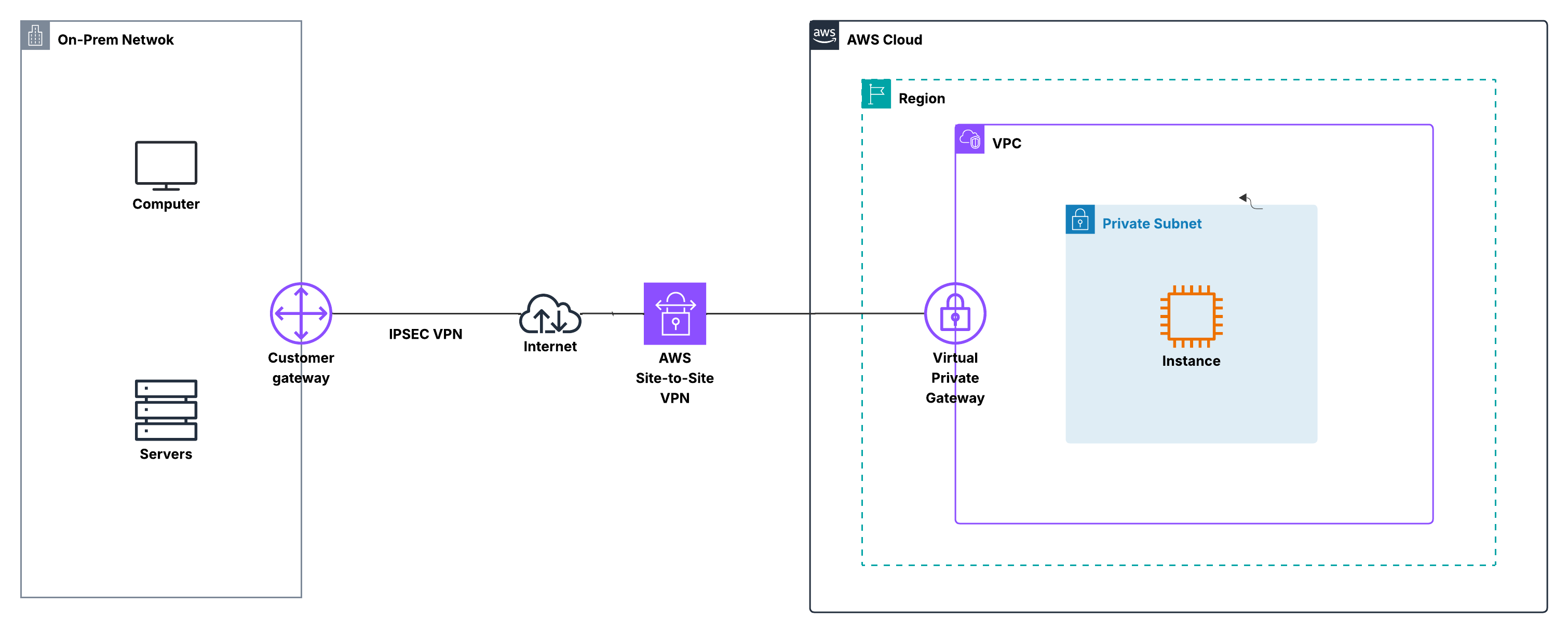
How Traffic Actually Moves
Imagine an on-prem server trying to reach an EC2 instance in a private subnet. The packet first reaches your customer gateway, which could be a firewall, router, or VPN appliance. Before leaving your network, the traffic is encrypted using IPsec.
The encrypted packet then traverses the public internet and arrives at the Virtual Private Gateway (VGW) attached to the VPC. AWS decrypts the traffic and forwards it into the VPC based on the associated route tables.
From the EC2 instance’s perspective, this is simply private IP traffic arriving from another routed network. No public IP addresses, NAT, or internet gateways are involved. Functionally, your on-prem and VPC CIDR blocks behave as though they are directly connected at Layer 3.
Did you know? AWS automatically provides two VPN tunnels for redundancy, so even if one tunnel goes down, the connection stays up.
AWS vs Customer Responsibilities
On the AWS side, the VPN endpoint is fully managed. AWS handles tunnel termination, encryption, key management, and high availability. You don’t need to deploy or maintain any VPN appliances inside the VPC.
On the customer side, the customer gateway is entirely under your control. You configure firewall policies, define which traffic is permitted, and manage routing. This gateway can be a commercial device such as FortiGate, Cisco, or Palo Alto, or an open-source VPN solution.
Tip: Even though AWS manages the cloud side, most connectivity issues originate on-prem. Missing routes or overly restrictive firewall rules are the most common reasons traffic fails to flow.
Tip: Even though AWS handles the cloud side, your on-prem configuration controls whether packets actually flow. Misconfigured firewall rules or missing routes are the most common causes of connection issues.
Routing Options: Static vs Dynamic (BGP)
Routing determines how each side knows where to send traffic. AWS Site-to-Site VPN supports both static routing and dynamic routing using BGP.
With static routing, you manually define which on-prem and VPC CIDR blocks are reachable across the tunnel. This approach is easy to understand and works well for small, stable environments, labs, or test setups. However, any network change requires manual updates, which limits scalability.
With dynamic routing, BGP automatically exchanges routes between your on-prem gateway and AWS. Your on-prem networks are advertised to AWS, and AWS advertises the relevant VPC CIDRs back. Route changes propagate automatically, and you can influence traffic behavior using standard BGP attributes. This makes BGP the preferred choice for production environments.
Important: When using BGP, the IPsec tunnel and BGP session must terminate on the same device, which must support both IPsec and BGP.
When to Use AWS Site-to-Site VPN
AWS Site-to-Site VPN is a strong choice when you need quick, secure hybrid connectivity with minimal AWS infrastructure. It is commonly used as an initial hybrid connection, a development or testing link, or a backup and failover path alongside Direct Connect.
Note: Traffic between on-prem and AWS always uses private IP addressing, carried securely through the VPN tunnel. From a networking standpoint, the two environments appear seamlessly connected through a routed, encrypted path.
2. AWS Transit Gateway + Site-to-Site VPN
Managing connectivity between multiple VPCs and on-premises networks can get complicated quickly. Each VPC requires VPN connections, route tables, and firewall rules, and as your environment grows, the number of connections can become overwhelming.
AWS Transit Gateway (TGW) simplifies this by acting as a central routing hub. When combined with Site-to-Site VPN, the Transit Gateway allows multiple VPCs and on-prem networks to connect through a single, scalable control point. Instead of juggling many point-to-point VPNs, you get a hub-and-spoke architecture that is easier to operate, monitor, and scale
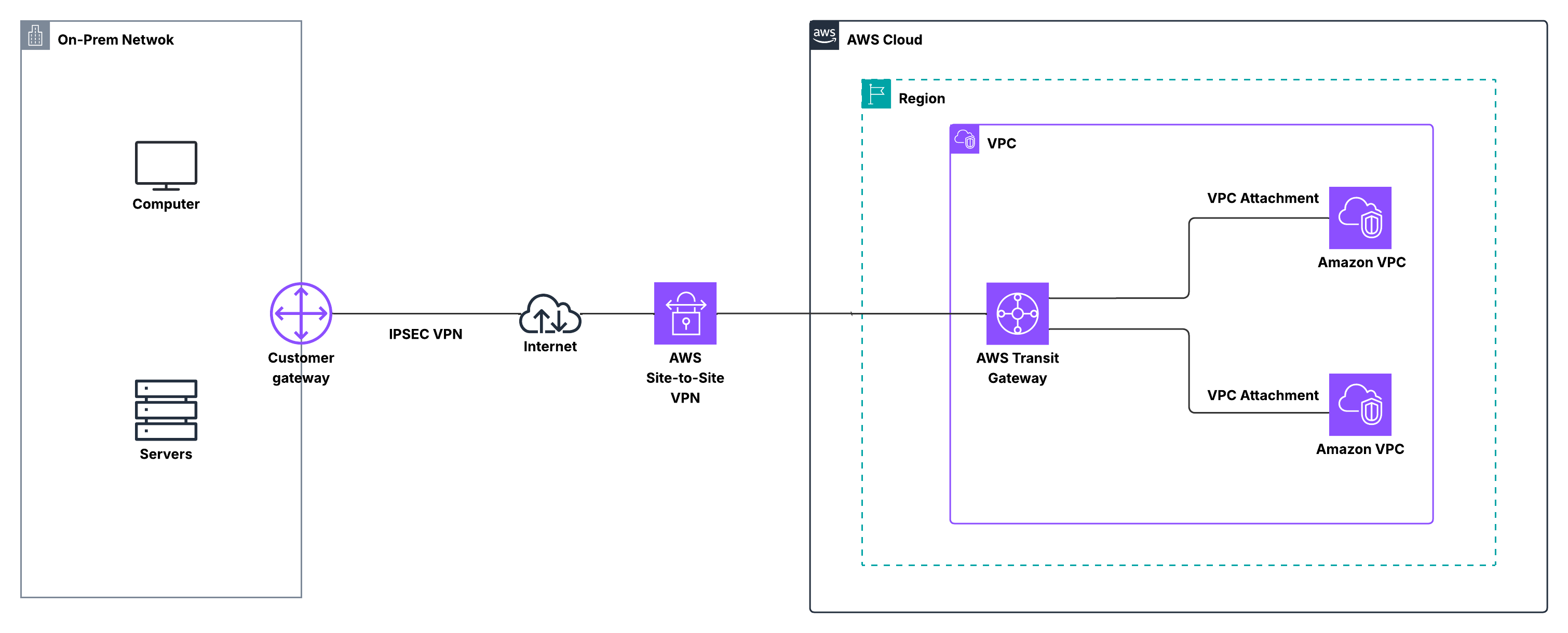
How Traffic Actually Moves
In this model, your on-premises device still functions as the customer gateway, encrypting traffic using IPsec. The encrypted packets traverse the public internet and terminate on a VPN attachment associated with the Transit Gateway.
Once the traffic reaches the Transit Gateway, routing decisions are made based on Transit Gateway route tables. The TGW determines which VPC attachment should receive the packet and forwards it accordingly. From there, the packet enters the destination VPC and is delivered to the EC2 instance using private IP addressing.
From the workload’s perspective, this is simply another routed hop inside a private network. No VPC requires public IP addresses, NAT, or internet gateways for this communication. The Transit Gateway behaves like a central traffic controller, ensuring packets reach the correct destination without each VPC needing direct awareness of every other network.
Pro tip: Compared to individual VPC VPN connections, TGW + VPN dramatically reduces configuration sprawl and keeps the architecture consistent as the environment grows.
AWS vs Customer Responsibilities
On the AWS side, Transit Gateway and the VPN attachments are fully managed. AWS handles tunnel availability, scalability, and the underlying routing infrastructure, significantly reducing cloud-side operational overhead in multi-VPC environments.
On the customer side, the customer gateway remains responsible for encryption, firewall enforcement, and route advertisement. When using BGP, your on-premises network dynamically advertises its CIDRs to the Transit Gateway, and the Transit Gateway distributes those routes to attached VPCs as needed.
Did you know? Transit Gateway supports automatic route propagation between VPN attachments and VPC attachments. This means you don’t have to manually edit individual VPC route tables each time a new network is added — a major operational advantage at scale.
Routing Options: Static vs Dynamic (BGP)
As with standard Site-to-Site VPN, Transit Gateway VPN attachments support both static routing and dynamic routing using BGP.
With static routing, you manually define which on-prem and VPC CIDR blocks are reachable over the VPN. While simple, this approach becomes difficult to manage as the number of VPCs increases.
With BGP, routes from the on-prem network are dynamically learned by the Transit Gateway and then propagated to the appropriate VPC attachments. This allows routing changes to flow automatically through the environment, making BGP the preferred option for production and multi-VPC designs.
Important: The IPsec tunnel and BGP session must terminate on the same customer gateway device, which must support both IPsec and BGP.
When to Use Transit Gateway + Site-to-Site VPN
Transit Gateway combined with Site-to-Site VPN is ideal when you need scalable hybrid connectivity across multiple VPCs and on-premises networks. Rather than creating a separate VPN for each VPC, the Transit Gateway provides a single hub through which all connectivity flows.
This design scales naturally. New VPCs can be attached to the Transit Gateway and immediately participate in existing VPN connectivity without changes to the on-premises configuration. Routing propagates automatically, operational effort stays low, and the network remains consistent as it grows.
Tip: For many organizations, TGW + VPN is also used as a backup or failover path to Direct Connect, providing internet-based resilience while maintaining a centralized and manageable hybrid network architecture.
3. AWS Direct Connect (DX)
Unlike VPN-based connectivity, which relies on the public internet, AWS Direct Connect (DX) provides a dedicated private connection between your on-premises network and AWS. This bypasses the internet entirely, offering predictable performance, low latency, and consistent bandwidth — essential for production workloads.
With Direct Connect, you establish a physical circuit from your data center or colocation facility to an AWS Direct Connect location. From there, traffic enters the AWS backbone and reaches your VPCs using private IP addresses. From a networking perspective, it’s like extending your on-prem network directly into AWS.
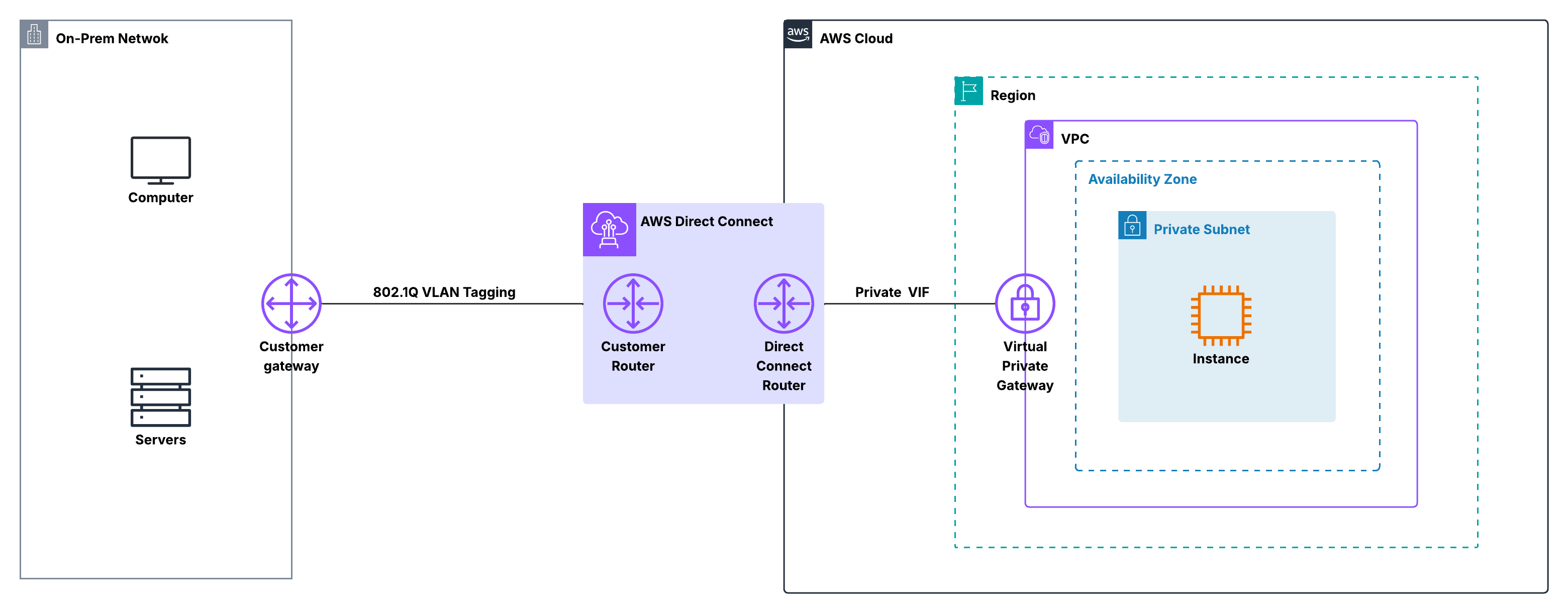
How Traffic Flows
When an on-premises system sends traffic over Direct Connect, packets never touch the public internet. They traverse the dedicated DX circuit to an AWS Direct Connect location, then enter the AWS global backbone, and are routed to the target VPC through a Virtual Interface (VIF).
Inside AWS, traffic is treated like any other private network path. EC2 instances in private subnets communicate using private IPs — no NAT, internet gateways, or public IPs are required. This private, controlled path is why Direct Connect is favored for latency-sensitive or high-throughput workloads.
Did you know? Direct Connect does not encrypt traffic by default, though many organizations run IPsec VPN over DX to combine private connectivity with encryption.
AWS vs Customer Responsibilities
AWS manages the Direct Connect locations, edge devices, and AWS-side routing into the cloud, maintaining the private backbone.
On your side, you handle the physical DX connection, customer router, and Virtual Interface configuration. Routing is typically done using BGP, allowing your on-prem network to advertise routes dynamically to AWS. This shared responsibility model gives you more control, but also requires more planning than a standard VPN.
Virtual Interfaces and Routing
Direct Connect uses Virtual Interfaces (VIFs) to control traffic flow:
- Private VIF: Provides access to VPCs through a Virtual Private Gateway or Transit Gateway.
- Public VIF: Provides access to AWS public services using public IPs.
Routing is handled via BGP, enabling dynamic route exchange and predictable traffic flow. When combined with a Transit Gateway, a single DX connection can reach multiple VPCs in a hub-and-spoke design, simplifying large-scale network management.
When to Use AWS Direct Connect
Direct Connect is best suited for workloads that require consistent performance and reliability. It’s commonly used when applications are sensitive to latency or jitter, or when large volumes of data need to move between on-premises and AWS on a regular basis.
It also scales well for enterprise environments, especially when paired with Transit Gateway, because a single dedicated connection can service many VPCs without the complexity of managing multiple VPN tunnels. Many organizations start with Site-to-Site VPN for speed and simplicity, then adopt Direct Connect as their environments mature and performance requirements increase.
4. Direct Connect + Transit Gateway
As cloud environments grow, connecting a single VPC is rarely enough. AWS Direct Connect combined with Transit Gateway (TGW) provides a centralized, high-performance hub for large-scale hybrid networks.
In this design, Direct Connect delivers a dedicated, private circuit into AWS, while the Transit Gateway acts as the routing hub inside the cloud. Together, they create a clean, scalable architecture that extends your data center into AWS with predictable performance and minimal operational overhead.
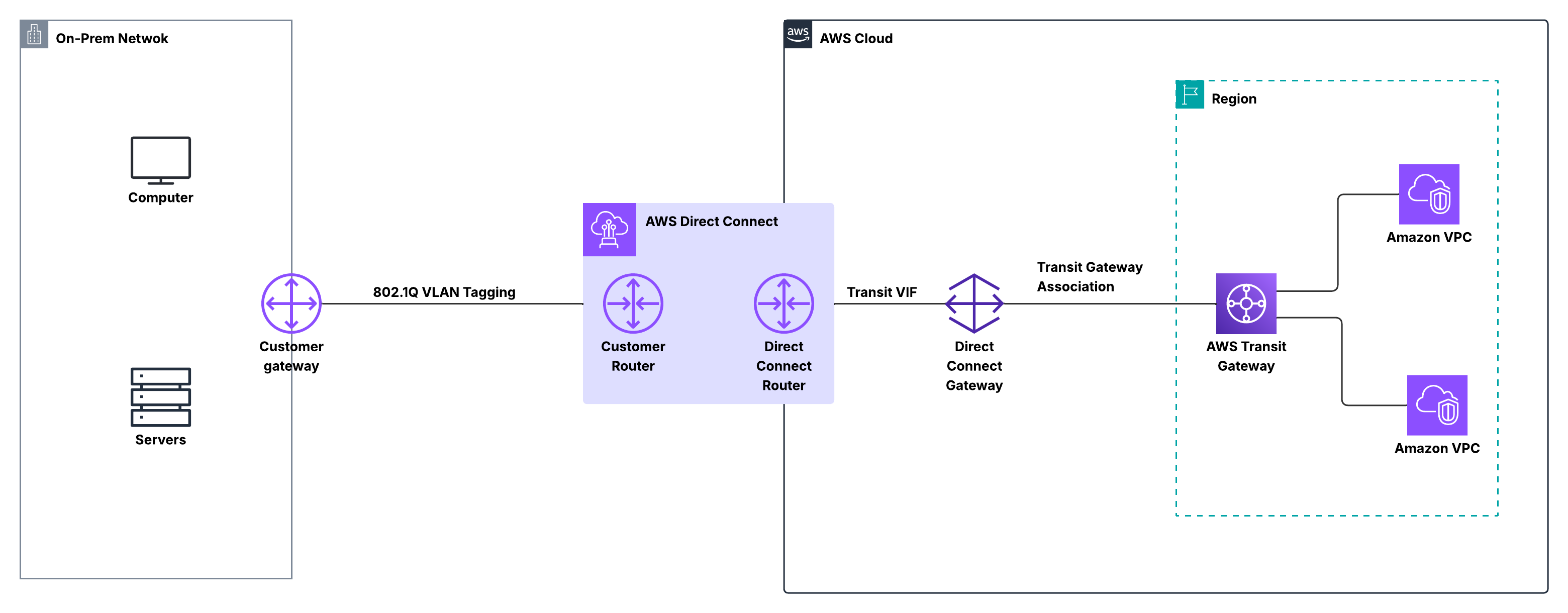
How Traffic Flows
Traffic leaving your on-premises network enters AWS over the Direct Connect circuit, bypassing the public internet. It reaches an AWS Direct Connect location, then enters the AWS backbone and is routed to the Transit Gateway via a private virtual interface.
The Transit Gateway then forwards traffic to the correct VPC based on its route tables. For workloads inside the VPC, this traffic is just like any other private network path — private IPs are used throughout, and no NAT or internet gateways are involved. From a routing perspective, Direct Connect acts as a spoke feeding into the Transit Gateway hub.
Did you know? A single Transit Gateway can support connectivity for hundreds of VPCs, all reachable through the same Direct Connect connection.
AWS vs Customer Responsibilities
AWS manages the Direct Connect infrastructure, the private backbone, and the Transit Gateway service itself. This includes the high availability and scalability of the cloud-side routing.
On the customer side, you are responsible for the physical DX connection, the on-prem router, and the BGP configuration that exchanges routes with AWS. Transit Gateway simplifies the cloud-side routing because you no longer need to manage individual VPNs or gateway attachments per VPC — everything flows through a single, centralized control point.
Routing and Scale
Routing is typically handled using BGP. Routes from your on-prem network are learned by AWS and propagated to all attached VPCs, while VPC routes are advertised back to your on-prem environment.
This architecture scales naturally: adding a new VPC doesn’t require changes to your Direct Connect configuration. Simply attach the VPC to the Transit Gateway, and routing propagates automatically. Compared to point-to-point designs, this keeps networks consistent, predictable, and easy to operate as they grow.
When to Use Direct Connect + Transit Gateway
This design is ideal for high-performance, low-latency connectivity across many VPCs and on-prem networks. It’s commonly used in mature AWS environments, where reliability and simplicity matter more than setup speed.
It also pairs well with VPN as a backup path, giving predictable Direct Connect performance while maintaining resilience through internet-based tunnels. For enterprises running critical workloads, Direct Connect + Transit Gateway often becomes the backbone of a scalable, production-grade hybrid network.
5. Direct Connect + Site-to-Site VPN
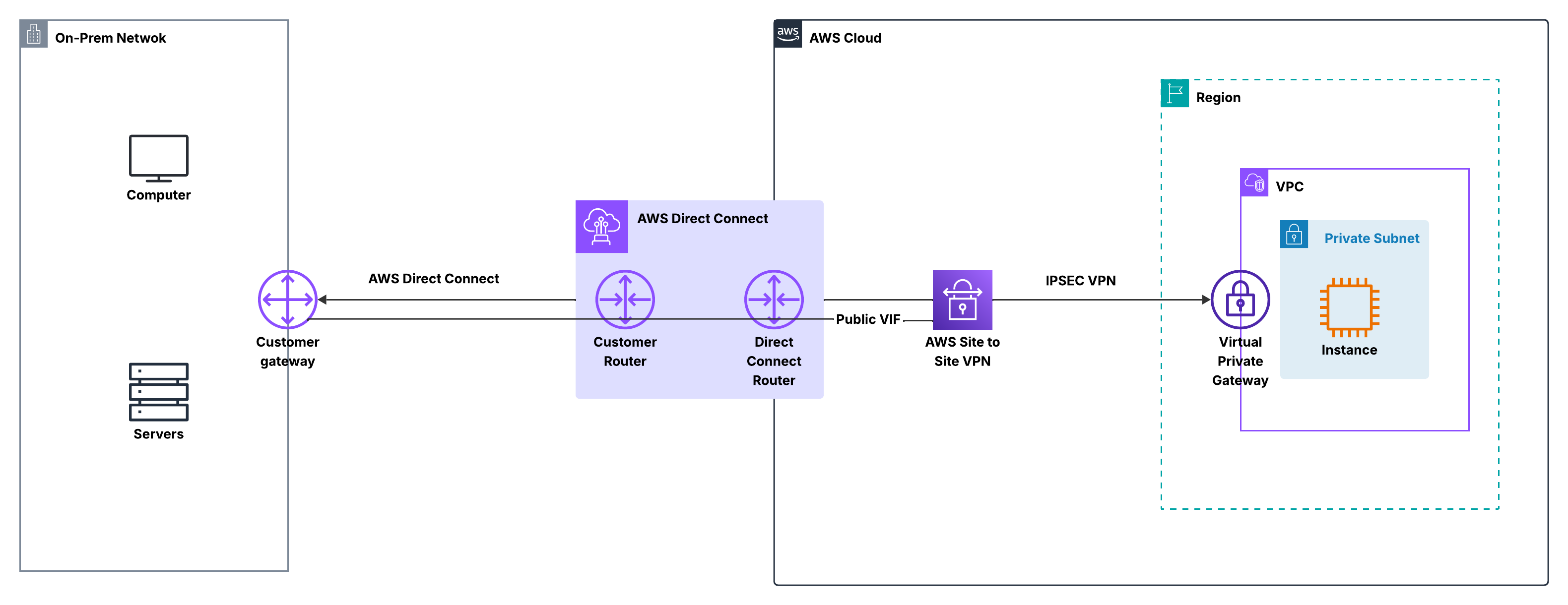
While Direct Connect gives you a private, high-performance path into AWS, many organizations still want encryption and resiliency on top of that connection. That’s where Direct Connect combined with Site-to-Site VPN comes in. In this design, Direct Connect is used as the primary transport, while a VPN tunnel provides encryption and an alternate path if needed.
Rather than choosing between VPN or Direct Connect, this approach lets you use both together, combining the strengths of each.
How Traffic Flows
Under normal conditions, traffic leaves your on-premises network over the Direct Connect circuit and enters AWS through a Direct Connect location. From there, it is routed into your VPC via a Virtual Private Gateway (VGW) using a private virtual interface, remaining entirely on private infrastructure without touching the public internet.
When a Site-to-Site VPN is layered on top, the VPN tunnel can either run over the Direct Connect link itself or act as a standby path over the internet, depending on your design. In both cases, traffic is encrypted using IPsec and decrypted at the AWS VPN endpoint before being routed inside the VPC. From the perspective of workloads, nothing changes: EC2 instances still communicate using private IP addresses, and routing determines whether traffic prefers Direct Connect or falls back to the VPN.
Important: Direct Connect does not encrypt traffic by default. Running a VPN over DX is a common way to add encryption for sensitive workloads.
AWS vs Customer Responsibilities
AWS continues to manage the Direct Connect infrastructure and the VPN endpoint on the cloud side, including the private backbone, tunnel availability, and gateway services. On your side, you manage the on-prem router or firewall, the Direct Connect cross-connect, and the VPN configuration.
You also control routing decisions, typically using BGP, to determine whether traffic prefers the Direct Connect path or the VPN path. This shared model provides flexibility, giving AWS-managed reliability in the cloud while maintaining full control over security and routing on-prem.
Routing and Failover Behavior
Routing is generally handled with BGP, allowing both Direct Connect and VPN paths to advertise routes. By adjusting BGP attributes such as local preference or AS-path, you can make Direct Connect the preferred path while keeping the VPN as a backup.
If the Direct Connect circuit goes down, traffic automatically fails over to the Site-to-Site VPN without requiring manual intervention. When Direct Connect is restored, traffic shifts back to the primary path. This behavior makes the design resilient and predictable, without complex routing changes.
When to Use Direct Connect + Site-to-Site VPN
This design is ideal when you want the performance and reliability of Direct Connect, but also need encryption and a built-in backup path. It is commonly used for production workloads that handle sensitive data, where security and uptime are equally critical.
It also works well as a transitional architecture: many teams start with VPN-only connectivity, add Direct Connect for improved performance, and then keep the VPN in place for redundancy. The result is a hybrid network that is secure, resilient, and ready to scale as requirements grow.
AWS Connectivity Solutions – CIDR, Routing, and Traffic Scope
| Connectivity | CIDRs / Subnets | Routing | Encryption | Traffic Scope | Notes |
|---|---|---|---|---|---|
| Site-to-Site VPN | On-prem ↔ VPC private subnets | Static or BGP | IPsec | Private subnets over internet | Quick, low-cost hybrid connectivity |
| Transit Gateway + VPN | Multiple VPCs ↔ on-prem | Static or BGP | IPsec | Private subnets across multiple VPCs | Hub-and-spoke scaling, automatic route propagation |
| Direct Connect (DX) | Private VPC subnets | BGP | Optional (VPN overlay) | Private path | Dedicated, low-latency, predictable performance |
| DX + Transit Gateway | Multiple VPCs ↔ on-prem | BGP | Optional (VPN overlay) | Private path across multiple VPCs | Centralized hub for large-scale environments |
| DX + Site-to-Site VPN | Private VPC ↔ on-prem | BGP | IPsec | Private path, VPN can be backup | Combines performance of DX with encryption/resilience |
Key Takeaway
For small or test environments, VPN is enough. For predictable performance, Direct Connect is the choice. For multi-VPC scaling, Transit Gateway centralizes routing. And if you need both performance + encryption + resilience, combine DX with VPN or Transit Gateway. The trick is choosing based on scale, performance needs, and operational overhead, not just AWS marketing.